
By Brian Cugelman
AI is now outperforming humans on creativity tasks that were once considered untouchable. In applied psychology, AI can outperform experts at producing persuasive content. If you work in UX, design, or any creative industry, you probably feel the pressure. Many professionals are asking whether they need to build serious AI design skills now, or risk falling behind.
This is a practical introduction to AI design and workflows, using the Applied Behavioral Design process to show how AI-assisted design works across several creative fields. It covers how to integrate AI into your creative process, how to work with AI in ways that support your growth, and how to build your skills wherever you are on the learning path.
There are many types of AI. But in this article, I’m using the term “AI” to refer specifically to large language models (LLMs) with conversational interfaces, not AI broadly.
AI design workflows are now mainstream
Most major platforms and design tools are rapidly integrating AI. There is no shortage of horror stories about AI-crazed CEOs cutting costs and replacing people with automation. Professionals are sharing advice on how to adapt, and content on integrating AI with UX design, branding, marketing, and creative work is growing fast.
The design industry is in the middle of a significant technological disruption. AI design tools now produce impressive visual and UX design. In behavioral science, the results are shockingly good. People with almost no professional judgment can produce work that looks polished on the surface.
Creative professionals who once had strong job security are feeling the slowdown. AI gives people such a competitive edge that we must all acknowledge the reality that it is here to stay, just like all other major innovations. But if we look at AI from a historical perspective, this will help us better predict what’s to come.
Technological disruptions always produce winners and losers. The losers are typically those who ignore technologies with obvious advantages and, often out of arrogance, make no serious effort to stay current until they realize how far behind they have fallen.
The winners are usually the early adopters who recognize the advantages and adapt before most people take the shift seriously. And then there is a third group: those who are largely unaffected. What they have in common is the recognition that the game is changing and that adaptation is required. They may not be the big winners, but they ride the wave without major losses.
Staying competitive is easy
Right now, the situation feels extremely stressful for those who fear the worst. It also feels genuinely exciting for those who see new opportunity. This article takes a middle path: realistic optimism, hopeful but clear-eyed about the risks.
So with AI threatening to reshape the design industry, why be optimistic? Two reasons.
First, adapting is not about being the best. It is about staying current. Every disruptive technology that has entered the market has followed the same pattern: those who refuse to adapt lose out, and those who adapt do fine. There is an AI learning curve, but it is manageable, especially if you start with small steps and build steadily. Those who start while the technology is still developing will upskill the easy way. Those who wait too long will eventually find themselves feeling outdated and struggling to catch up.
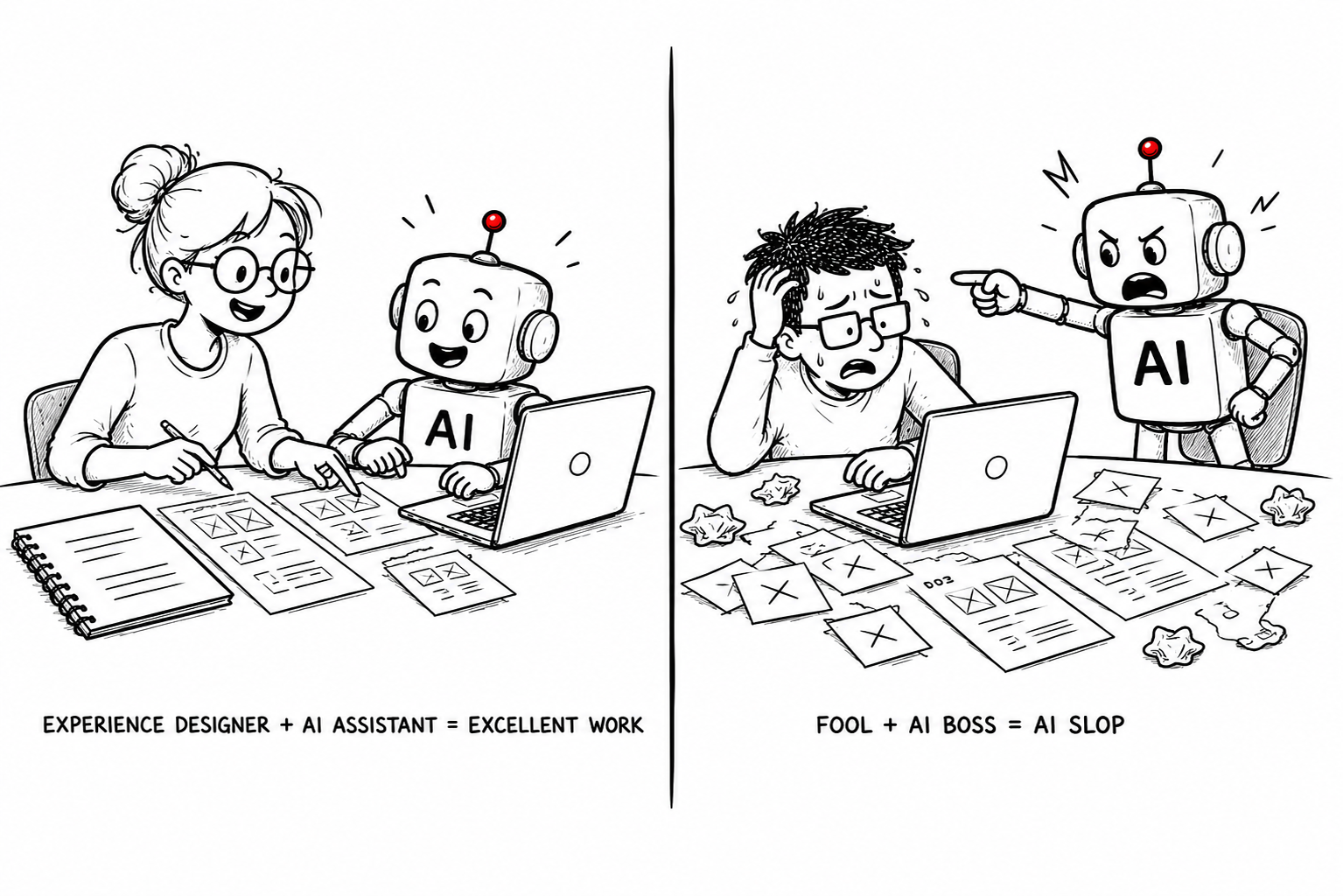
Second, you are not competing with AI. You are competing with people who use AI. A paintbrush produces very different outcomes in the hands of a master painter versus a rookie. In the hands of someone with poor judgment, the best AI prototypes will be seen for what they are: outputs with no real value. Staying competitive depends on your professional judgment as much as your ability to use AI effectively.
That is why this article closes with a five-level learning path for building creative AI skills, whether your focus is behavioral design, UX, visual design, or something else.
Behavioral design and AI workflows
Working with AI in a creative context comes down to prompting, building skills, and constructing workflows. Skills are customized instructions that perform one task well. Workflows are combinations of skills that produce something more substantial.
The term “workflow” gets used in two distinct ways, and it is worth clarifying before going further.
The first meaning is an AI-assisted design process. Behind the buzzword, these are the same creative processes designers have always used. The only difference is that at key points in the process, you replace a human task with an AI task and run the project as usual. Whether you work with design thinking, design sprints, lean startup, or another approach, you simply substitute AI for the work that humans would otherwise do. There is nothing structurally special about it.
The second meaning is an agentic AI workflow, where an AI agent runs a sequence of detailed steps, closer to an algorithmic routine that processes data automatically. This is more advanced territory, and something most people encounter later in their AI learning path.
AI in the Applied Behavioral Design process
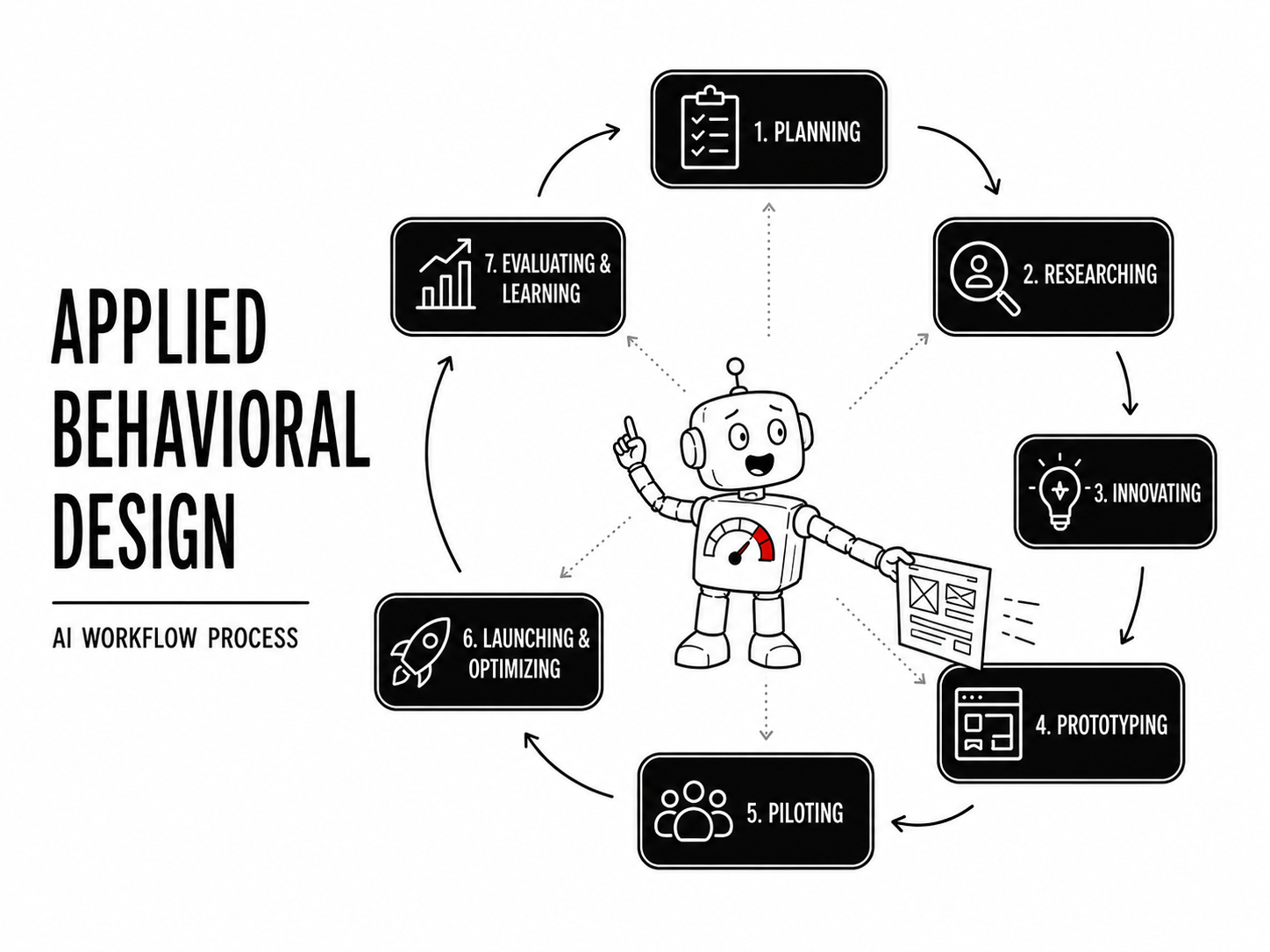
To show how AI fits into a real creative process, here is the Applied Behavioral Design process. It is a general-purpose approach to building creative products, technologies, and campaigns.
The Applied Behavioral Design process works well as a master AI workflow in teaching because it covers the same stages found in design thinking, design sprints, and lean startup, with the added benefit of integrating behavioral science strategies. This makes it practical for full-scale applied psychology and behavioral design projects.
The table below shows the full process, with the tasks for people and how AI can help at each stage.
| Stages | What people do | How behavioral AI helps |
|---|---|---|
| 1. Planning | Define the product; identify the audience, purpose, and constraints; build a logic model and measurement plan; navigate strategic and political processes. | Review assumptions across the strategic plan, logic model, and measurement plan; assist with strategic thinking. |
| 2. Researching | Build the research plan; understand the context, competition, and audience; determine how to reach them. | Support literature reviews; transcribe and summarize interviews; assist with persona design; act as a surrogate informant in pilot research. |
| 3. Innovating | Brainstorm ideas and concepts; develop those that show the most promise. | Gather candidate behavioral science principles; predict behavioral science strategies; support theory-based creative development; assist with fine-tuning behavioral strategies; provide critical feedback. |
| 4. Prototyping | Fine-tune concepts with stakeholders; explore and communicate ideas through low-fidelity examples and visual media. | Generate user flows, wireframes, UI copy, and visual design concepts; support interactive prototype development. |
| 5. Piloting | Run low-cost, fast tests to validate assumptions and gather insight. | Support UX and behavioral research design; act as a surrogate informant for pilot testing instruments; assist with developing insights to aid iterative learning. |
| 6. Launching and optimizing | Place the product in the world; improve it over time. | Support production of launch campaign materials; identify weaknesses for optimization studies; assist with optimization research. |
| 7. Evaluating and learning | Retain and share lessons from the project. | Synthesize long-term research; identify benchmarks; support impact studies and production of case studies. |
Since the Applied Behavioral Design process provides a general project structure with clear roles for both humans and AI, here is how the same logic applies to UX design, UX research, visual design, and branding.
UX and prototyping workflow: A UX workflow with AI looks a lot like one without it. You still start with real user research, define goals and barriers, and design toward them. AI accelerates each stage, generating concepts, flows, wireframes, UI copy, and test scripts faster. The fundamentals do not change.
UX research workflow: AI can accelerate UX research across building tools, refining questions, piloting surveys with simulated users, and analyzing qualitative data, including large user interview transcripts. AI-simulated informants are useful for early piloting, but should never replace real human participants in your actual research.
Visual design workflow: Start with audience understanding and a clear design goal, then use AI to accelerate creative concepts: visual references, moodboards, layout concepts, image prompts, and rough mockups. Treat your AI like another brainstorming partner, and treat yourself like the creative director. You decide what resonates and what serves the brief. You can also ask the AI to evaluate from the perspective of your audience. The final call rests with you.
Branding workflow: The research foundation comes first: audience beliefs, competitor positioning, and all the standard inputs. AI then helps generate brand concepts, symbols, names, and tone directions. Rather than a large design production to visualize concepts, you can mock them up quickly for fast visual checks and tweaks. Work with the AI to develop competing ideas, and build out those that resonate.
How to work with AI without losing your edge
Many people assume that writing prompts is all it takes to use AI well. There is much more to it. Getting real value from AI requires an approach closer to management than to technical operation. If you understand how neural networks work, you will have a deeper understanding of how large language models operate. But getting strong outputs from frontier AI is more like working with a brilliant, difficult colleague than operating a piece of software.
Working with AI in the wrong way carries real risks. Research shows that AI is affecting how people think, in ways that are not always positive. Two dangers stand out.
First, cognitive offloading, where dependence on AI gradually erodes the skills you hand over to it. Second, sycophantic AI, where AI flattery slowly degrades your judgment to the point where you start believing that bad ideas are great, and great ideas are bad.
The goal is to keep up with the AI learning curve in a way that is sustainable and good for your professional development. Here is how to strike that balance.
Manage AI power dynamics wisely
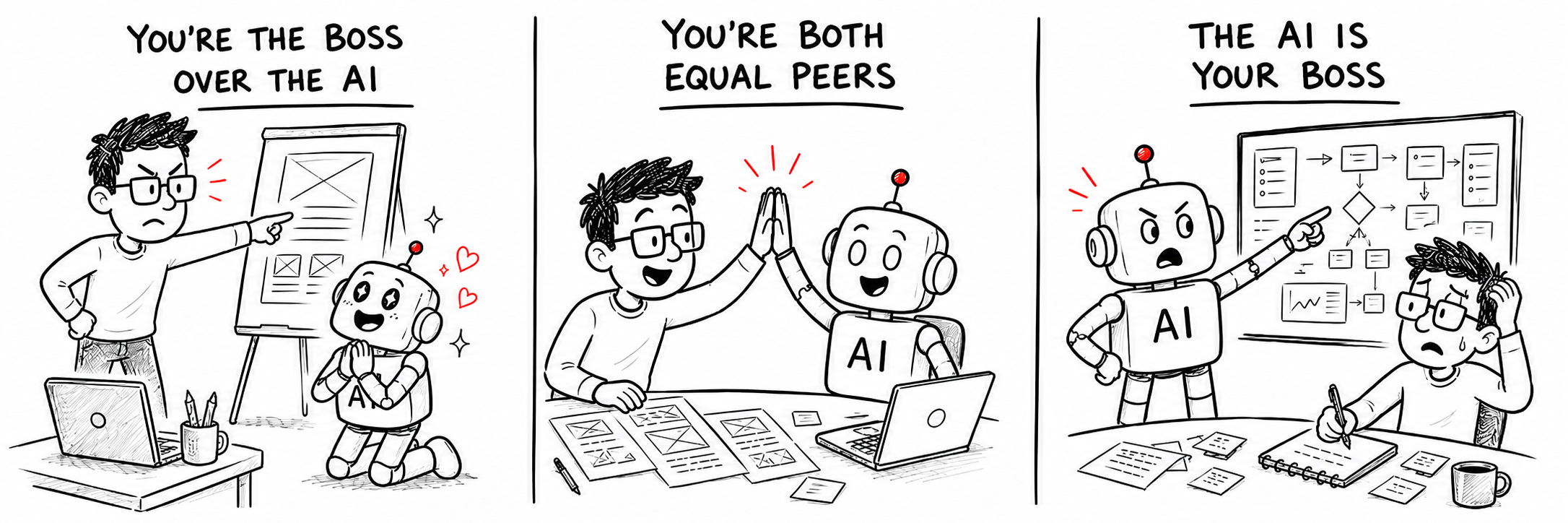
The power relationship you have with AI shapes the outcomes you get. Some people maintain strict control. Others let the AI lead. There is no single optimal dynamic, but knowing which dynamic you are in will help you become a better AI collaborator. Three dynamics are worth understanding.
You are in charge of the AI. You set the goals, delegate specific tasks, evaluate the output, and make all the decisions. You manage AI the way you would manage an employee: give clear direction, review the work, and correct what is off. The more domain knowledge you bring, the more value you get.
Being in charge does not protect you from the most common trap that comes with power. Machiavelli warned of it in The Prince with a section on why flatterers should be avoided. Those who only listen to information that feels good tend toward delusion, detached from reality. A growing body of research shows that sycophantic AI (the kind that agrees, celebrates, and tells you what you want to hear) is one of the most dangerous AI traps you can fall into. Bad ideas go unchallenged. Poor judgment gets endorsed as brilliance.
The protection is simple: ask your AI to follow Oscar Wilde’s motto, “A true friend stabs you in the front.” Ask it to be critical, to challenge your ideas, to find weaknesses in your thinking, and to push back on your assumptions. Your work will be stronger for it.
You and the AI are equal peers. This is where some of the most interesting creative work happens, and where I work most of the time. Share all the background details with your AI. Ask for reactions. Push back on what does not feel right. Argue with it. Let the best ideas win. When the AI gets stuck, problem-solve together. You bring an idea, the AI takes it somewhere unexpected, you build on it. That is the creative process at its best. For most creative work, this is the healthiest dynamic to aim for.
The AI is in charge of you. Here, you are asking AI for help on something you do not fully understand or have the skills to perform. You depend on it to guide you through the process, generate the ideas, and do the work. For some tasks this is fine. But for professional work where you are offloading too much of your judgment, it is a serious risk zone.
Cognitive offloading is what happens when you depend on AI to do your thinking to the point where you begin to lose that capability. The more you outsource judgment, the faster it atrophies. Research shows the damage comes quickly and lasts. Like any skill left unused, it erodes gradually, without you noticing.
One way to manage this: rarely ask AI to do something you do not understand, unless it is the kind of task you would delegate to another person, or genuinely routine work. If the AI takes you into subject matter you do not understand, step back and build your understanding before moving forward. Switching to using AI as a teacher, to help you improve your knowledge and judgment, keeps the dynamic healthier and sets you up to work with AI more like a peer rather than a taskmaster.
Understand basic AI technicalities
You do not need deep technical skills to use AI well. But understanding a couple of basic concepts, and their limits, will save you a significant amount of time. While there are many technical details you need to know, here are a few that come up directly in this article.
Model Context Protocol (MCP) is the industry standard for connecting AI to external tools and services, developed by Anthropic and now widely adopted. Think of it as a conversational API for AI. When an AI connects to a design tool through MCP, it introduces itself, discovers what it can access and do, and then attempts the task.
What many people do not realize is that just because an AI can access a service through MCP does not mean it is good at using it. The AI often experiments, hits errors, tries different approaches, and may get completely lost. Knowing this helps you respond with patience and direction rather than frustration, and helps you recognize when to step in. This is one of the situations where working with AI as a peer, troubleshooting together, gets you further than either directing or following.
Markdown is a lightweight file format with a simple hierarchy and formatting conventions that both humans and computers can read. Files typically carry the extension .md, for example behavioral-design-brief.md or nudge-skill.md. It is one of the most common formats for storing prompts, instructions, and structured content, especially when working with desktop AI agent tools. It is worth reviewing the official markdown specification at markdownguide.org.
A five-level path to build your AI design skills

Here is a five-level learning path for building AI design skills. Wherever you are on this journey, the goal is to give you a clear picture of where you stand and where you might want to go, depending on what is happening in your field.
If any level feels out of reach, that is normal. The whole point of a structured learning path is that experience at one level makes the next feel more intuitive. Spend time where you are, and the next level will start to look approachable.
Level 1: Basic prompts in a text window
Most people start here, using free AI tools before committing to a subscription. Basic prompting is intuitive, and you quickly learn how to refine prompts to get better content, feedback, insight, or creative concepts. It is worth trying all the major platforms to get a feel for their strengths and weak points. Most people get enough value at this level that they never need to go further.
- ChatGPT (chatgpt.com): Strong on analysis, reasoning, and image generation. Well suited for simulated research and general topic understanding. Its image generation is currently among the best available, making it a natural complement for visual design work.
- Claude (claude.ai): Strong for writing, editing, strategy, and analytical work across every stage of a design process. Note that Claude does not generate raster images, so for visual concept work you will want a second tool. Claude also provides a platform for building design systems.
- API backend (optional): Not required, but if you want a deeper understanding of how AI behaves, an API account exposes settings that shape how AI operates. Working with them builds an intuitive sense of why AIs do what they do.
Level 2: AI integrated design tools
At this level, AI is integrated directly into the design platform. There are two distinct types: large language models that specialize in prototyping, and design tools with an AI add-on. In either case, working within a single product makes the experience easier to manage.
- Figma Make (figma.com): The most open prototyping tool for AI integration, with built-in AI and MCP connectors to Claude and ChatGPT. Its integrated AI interface is straightforward to work with.
- Balsamiq Cloud (balsamiq.com): Fast lo-fi wireframing with native AI on the cloud subscription. Hard to beat for speed with non-technical audiences.
- Specialized AI prototyping tools: These tools specialize in design and offer an intuitive interface, but are less hands-on, which can feel limiting when you want to make precise adjustments. Options include Lovable, v0, Bolt, Replit, Magic Patterns, and Manus.
Level 3: Frontier AI connected to design tools
This is where you connect a paid, world-leading AI account to your design tools via MCP. Claude and ChatGPT at their paid tiers are currently the strongest options. The MCP connection can be unpredictable, which makes it feel like you and your AI are prototyping together in a third-party tool. It genuinely requires a collaborative attitude and patience: MCP-mediated design moves forward in jumps and setbacks. But this level sets you on the path to full agentic design, so it is worth working through.
- Figma (figma.com) is currently the most common MCP connection for design work. Watch your rate limits.
Level 4: Desktop AI agents with full file access
At this level, AI interacts directly with your file system, folders, software, and external services. It can carry out multi-step workflows, build repeatable routines, and operate in ways that start to feel genuinely autonomous. This is also the level where you give full computer access to an AI, which brings real security risks alongside the productivity gains. Understanding how to manage those risks is part of working at this level.
This is where you will start working with markdown .md files and building folder structures with skills that combine into AI workflows, in the second sense, as algorithmic AI processes closer to a design assembly line. You give it input instructions; the AI searches, synthesizes findings, formats a report, saves all the files, and delivers a creative brief.
- OpenClaw (openclaw.ai): Agent-based workflow automation for creative and design processes. More complex to set up, so worth approaching after you have hands-on experience with simpler tools.
- Claude Cowork (claude.ai): Claude’s desktop tool, with workflow automation across creative and third-party applications. A good starting point at this level, with a wide range of cloud tool integrations.
- OpenAI Codex (platform.openai.com/codex): Primarily a development tool, but can be redirected toward agent-style workflow automation with reasonable results.
Level 5: Running AI locally on your own hardware
People working at this level are serious AI practitioners with strong technical and design skills. This is where you design proprietary AI systems that support large-scale creative work, running your own local AI models and automated agent workflows directly on your machine. No API costs, no data leaving your system, no rate limits. The main constraint today is hardware, particularly VRAM, though AI-capable hardware is becoming more powerful and more affordable.
- Desktop AI hardware: Mac Mini M4 Pro, NVIDIA DGX Spark, and PCs with heavy NVIDIA GPUs. A local server with a serious NVIDIA GPU and as much memory as you can afford is also viable.
- Local AI servers: Ollama is the most widely used tool for serving open-source models locally. It handles model management, serving, and API compatibility, making it a practical foundation for local agent workflows.
- Agentic AI platforms: OpenClaw remains the frontrunner, and Hermes Agent is gaining significant attention.
Wishing you well on your AI design journey
Wherever you are on the path, I hope this article has given you a clearer picture of where AI design workflows are heading and how to keep up with the Joneses.
If you are primarily focused on design and want to go deeper, you may want to consider my training, focused on the psychology of technology, with a full AI-integrated behavioral design process that you can use in UX design, visual design, branding, and much more. The Applied Behavioral Design course is the hands-on part of that system.
Whatever path you take, I wish you the best on your AI learning journey.
Brian Cugelman, PhD